Benji Pays now emails your customers when a saved card expires, is permanently declined, or an automatic payment fails.
This allows them to fix the payment method without waiting for your team to notice.
Benji Pays automates invoice follow-up, online payments, and reconciliation for managed service providers (MSPs) and invoice-based businesses. Saved cards make automatic payments easy until they stop working. Then someone on your team has to find the failure, contact the customer, ask for a new card, and follow up until it is updated.
Payment method update reminders and failed payment notifications automate that exception handling.
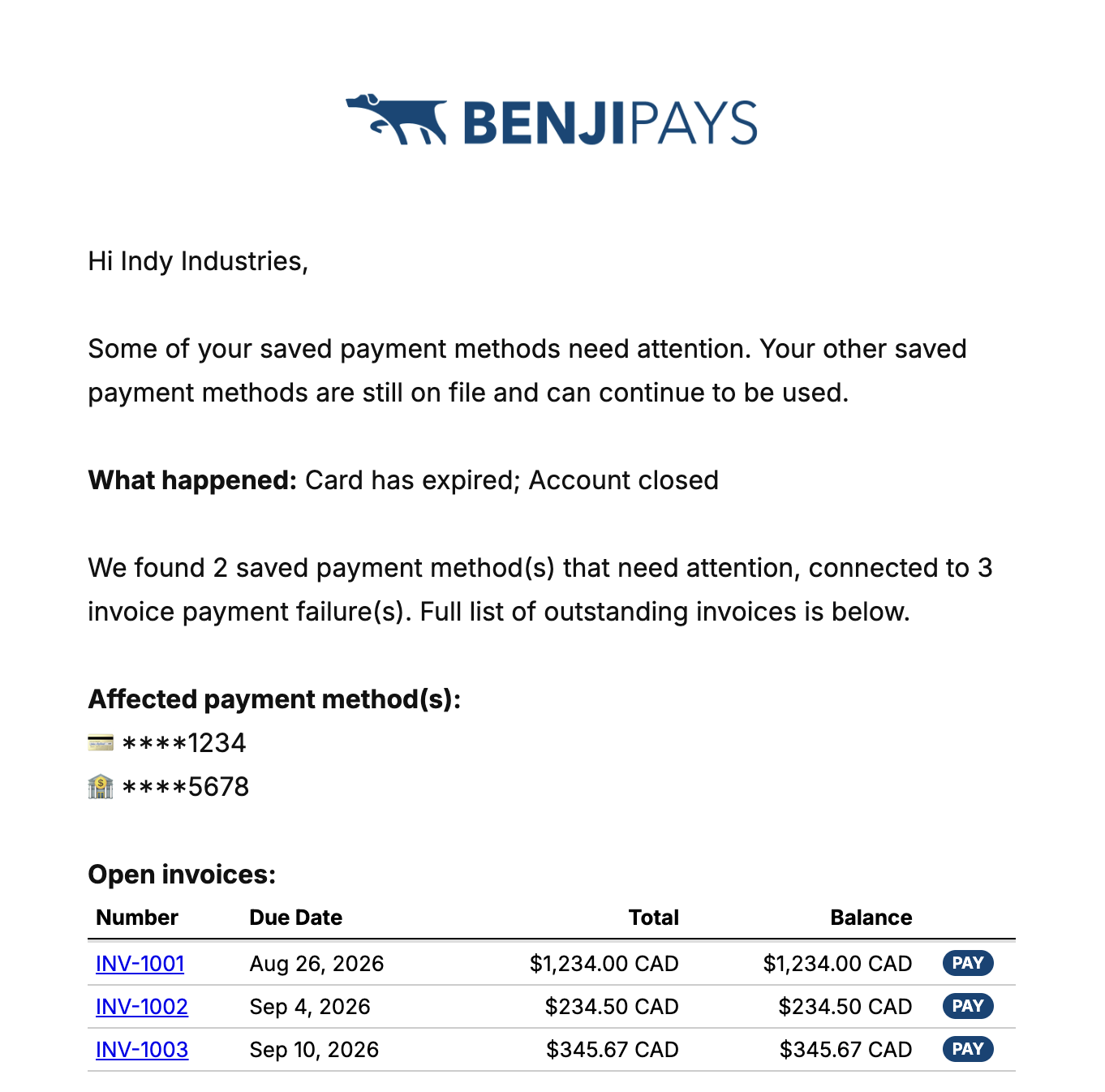
When a saved card expires or is permanently declined, Benji Pays can email the customer with the last four digits of the card that failed, the invoices tied to it, and a secure link to add a new payment method.
No portal login. No password. No call to your team.
When a saved card expires
When a card expires, the next payment cannot be processed. Payment method update reminders take that follow-up off your plate.
Benji Pays can email the customer directly, identify the card that needs attention, show which invoices are affected, and provide a secure link to enter a replacement payment method. The customer can fix the problem themselves and get automatic payments back on track.
When a card is permanently declined
Some declines are temporary. Others mean the saved payment method is no longer going to work.
When Benji Pays identifies a permanent decline, it can prompt the customer to replace the payment method instead of leaving your team to retry the same card or chase the customer by hand.
The goal is simple: recognise when customer action is required, and ask for it immediately.
When an automatic payment fails
Customers can also receive a notification when an automatic payment does not go through.
A failed payment no longer has to sit unnoticed until someone on your team finds it. The customer knows what happened, and your team does not have to send a one-off email explaining the issue.
You decide what gets sent
These emails run through Invoice Rover, Benji Pays’ collections engine. You decide which failures count, which payment types count, and when the emails fire. The emails also stop automatically when the card has been updated.
It works with automatic account updater
Some expired cards never need a customer email at all. Automatic account updater refreshes a saved card in the background when the issuer reissues it, so the next payment goes through without anyone doing anything.
Automatic account updater is live on all Benji Payments merchant accounts, and it is available through many of our partner gateway integrations. Contact your gateway provider for details on your account.
The two features work together. Account updater handles the cards that can be fixed silently. Payment method update reminders handle the ones that cannot, such as a closed account or a permanent decline. If a card updates itself before the customer acts, the reminders stop on their own.
You asked for this one
This feature exists because customers asked for it, publicly and repeatedly, on our feature request board.
- Automatically email customers for updated card when old one expires or is declined permanently
- Option to send Declined or Transaction Failed emails to clients
Both are now marked Shipped. That is how our roadmap works: you tell us what is costing your team time, you vote on it, and we build it. If something here is still manual for you, add a request or vote on an existing one.
Automate the exceptions, too
Expired cards and declined payments are a normal part of recurring payments. The more of that follow-up you automate, the less time your team spends monitoring exceptions and chasing customers.
Identify the problem quickly, put the right information in front of the customer, and automate the next step wherever you can. The only thing that should be outstanding is your business.
Read the setup guide for Payment Method Update Reminders, or book a demo to see how Benji Pays automates invoice follow-up, online payments, and reconciliation.