Benji Pays
Benji Pays facts, checked November 23, 2026.

Accounts receivable (AR) automation for Microsoft Dynamics 365 Business Central is software that collects payment on your Business Central invoices and records each payment in Business Central. On the Elite plan and up, Benji Pays imports your customers and open invoices and records each payment as cash receipt journal lines. Here is how ten tools compare, using facts from each vendor.
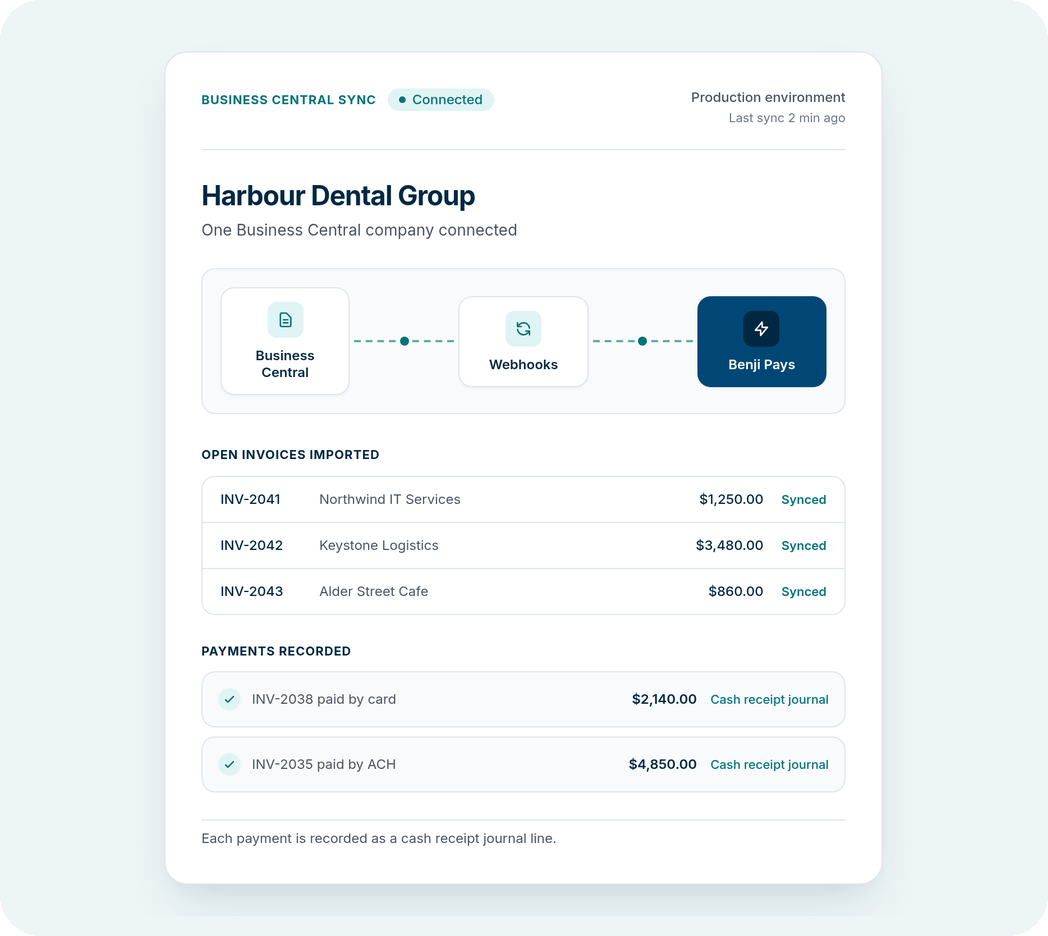
Business Central keeps your invoices and your books. AR automation connects to your Business Central company and handles each step from invoice to recorded payment.
Import customers and open invoices from Business Central.
Send reminders on unpaid invoices on a schedule you set.
Take card and bank payments in a customer portal, or by AutoPay on a saved method.
Record each payment in Business Central as cash receipt journal lines.
Benji Pays facts come from Benji Pays. Each competitor row comes from that vendor’s own website or help center, checked November 23, 2026. Not stated means we did not find the fact there. See the sources.
Benji Pays
Yes, on the Elite plan and up. Imports customers, open posted sales invoices and open credit memos, and records each payment as cash receipt journal lines. Changes arrive by webhook within a few minutes
Card, U.S. ACH or Canadian EFT with Benji Payments, or card through an existing gateway
Yes, self-serve
Yes, Auto Processing
Yes, Invoice Rover automated dunning
Benji Payments, or keep your existing merchant account
Invoiced
Yes, two-way sync. New data syncs once per hour, and Invoiced transactions post in real time
Card, ACH, direct debit and PayPal
Yes, self-service
Yes, card and direct debit
Yes, Customer Chasing cadences
Supported gateways: Flywire and GoCardless
Chargezoom
Yes, connects to Business Central and posts cash receipts back
Card, ACH and eCheck
Yes, self-service
Yes, on a saved card or ACH
Yes, collections follow-ups by its AVA agent
Chargezoom payments
Centime
Listed as an integration. Its Business Central page covers AP. AR details not stated
ACH, card and check
Yes, branded, no login needed
Not stated
Yes, reminders and escalations on your cadence
Centime B2B merchant processing
Chaser
Yes, syncs payment data before every reminder, every hour or on demand
Not stated
Yes, payment portal
Not stated
Yes, email and SMS
Connect your payment provider
Paidnice
Yes, AR automation for Business Central
Card and bank debit through Stripe
Yes, no login needed
Not stated
Yes, email and SMS
Stripe
Upflow
Not yet. Listed as coming soon on its homepage
Card and direct debit (ACH, SEPA, Bacs)
Yes, branded
Yes, card and direct debit
Yes, dunning reminders
Upflow Payments, powered by Stripe
BILL
Yes, two-way sync across AP and AR
ACH and credit card
Yes, self-service
Yes, auto-charge and auto-pay
Yes, automated
BILL payments into your bank account
AR Collect
Not stated
Card and ACH/eCheck
Yes, with payment links
Not stated
Yes, email and SMS
Its payment processing integration. Gateways vary by region
Biller Genie
Not stated
Card, ACH and alternative methods such as PayPal
Yes
Yes
Yes, email and paper mail
Connect your existing gateway
Accounts receivable (AR) automation for Microsoft Dynamics 365 Business Central is software that collects payment on your Business Central invoices and records each payment in Business Central. On the Elite plan and up, Benji Pays imports your customers and open invoices and records each payment as cash receipt journal lines.
Benji Pays imports your customers, open posted sales invoices and open credit memos. Webhooks bring the changes you make in Business Central into Benji Pays within a few minutes.
Benji Pays records each payment in Business Central as cash receipt journal lines.
The Microsoft work account that connects needs an Essentials or Premium licence. A Team Member licence cannot post cash receipt journals.
Each Benji Pays account connects to one Business Central company in one environment.
Customers pay by credit or debit card, U.S. ACH or Canadian EFT with Benji Payments, or by card through an existing gateway.
No. You can keep your existing merchant account or use Benji Payments.
Microsoft Dynamics 365 Business Central is on the Elite plan and up, including Enterprise. Our software fees never take a percentage of your revenue. Processor fees still apply. See plans and prices on the Benji Pays pricing page.
Each competitor row comes from the website or help center of that vendor, checked on November 23, 2026. A cell reads Not stated when we did not find the fact there. Features change, so confirm the details with each vendor before you decide.
We will walk through your invoices, your payment setup and your questions.
Benji Pays facts, checked November 23, 2026.
Public pages from Invoiced, checked November 23, 2026.
Public pages from Chargezoom, checked November 23, 2026.
Public pages from Centime, checked November 23, 2026.
Public pages from Chaser, checked November 23, 2026.
Public pages from Paidnice, checked November 23, 2026.
Public pages from BILL, checked November 23, 2026.
Public pages from AR Collect, checked November 23, 2026.
Public pages from Biller Genie, checked November 23, 2026.