Benji Pays
✓ No contracts. Stop anytime.
Use Benji Pays because it works for your business. Standard, Advanced and Elite offer monthly or annual billing with no required contract.
✓ No additional monthly account or PCI fees with Benji Payments.

Your MSP. Your payments.
Your choice.
Payment automation built by technologists who understand MSP operations. Connect your PSA and accounting, choose a supported processor, and work directly with the team that builds your integrations.
Benji Pays
Use Benji Pays because it works for your business. Standard, Advanced and Elite offer monthly or annual billing with no required contract.
✓ No additional monthly account or PCI fees with Benji Payments.
ConnectBooster
Its terms specify a Committed Service Term for a defined period. The length of your commitment is set in your order.
✕ Additional gateway and processor fees are documented.
Legacy BNG gateway charges and EPX/XplorPay account fees are shown below. Your setup determines which apply.
Committed service terms (opens in a new tab)Gateway fee schedule (opens in a new tab)
Benji Payments is the integrated processing option. Third-party merchant agreements have their own terms. Enterprise arrangements are custom; see contract scope. ConnectBooster’s order sets the duration; no universal multi-year term is claimed.
Benji Pays and ConnectBooster both automate collections and give customers a portal to pay invoices. The useful comparison goes deeper: processor compatibility, accounting treatment, software pricing and the team behind the connections.
Benji Pays brings those decisions together with integrations built and maintained in-house, published software plans, and a choice between Benji Payments and supported existing processors.
Benji Pays
Fully integrated refunds connect the payment action to your accounting system. Process the refund in Benji Pays and synchronize the accounting update automatically.
Less manual bookkeeping after a refund.
ConnectBooster’s documented BNG workflow
Its guide instructs you to issue the refund in BNG, then manually zero out or delete the QuickBooks payment receipt. Your team completes the accounting work separately.
The guide notes that other processing integrations may differ.
With Benji Payments, settlement reconciliation also records payments, processing fees, transfers and adjustments in supported accounting systems. See the accounting entries (opens in a new tab).
Your stack. Your workflow.
Your total cost.
| What matters to your MSP | Benji Pays | ConnectBooster |
|---|---|---|
| Processor choice Connect the payment setup you need | Benji Payments or your supported processor. Choose integrated processing through Benji Payments, or connect a supported existing merchant account. Compatibility depends on your gateway and region. | Supported processing partners. ConnectBooster requires approval and an agreement with a processor it supports. Confirm whether your current account can be used. 1 |
| Software pricing Compare software and processing separately | Plan + approved transaction count. Advanced includes PSA integrations at $219 USD/month billed annually, or $259 USD monthly. Standard starts at $139 USD/month annually. No percentage of payment volume for the platform. | 0.5% with a floor in the documented example. At $100,000/month, the example produces a $500 software fee before processing fees. The guide covers legacy consumption accounts; your agreement determines the floor, rate and cap. 2 |
| Volume and transaction counts Know what changes your bill | No dollar-volume cap. Standard and Advanced include 100 approved transactions/month, then $0.80 USD on Standard and $0.80 USD on Advanced. Larger invoice amounts do not increase the platform fee when transaction counts stay the same. | Dollar volume drives consumption fees. The legacy guide uses a $199 floor and 0.50% rate in its example. It also describes a standard $1,000 software-fee cap, subject to the agreement. 3 |
| PSA workflows Keep your service desk connected | HaloPSA · ConnectWise PSA · Autotask. Documented invoice PDFs and payment links, with platform-specific customer/contact options. PSA integrations are included on Advanced and above. | ConnectWise · Autotask · Kaseya BMS. Setup guides document these connections. Compare invoice images, agreement-based AutoPay and customer/contact data for your PSA. 4 |
| Accounting integrations Match the ledger you use | QuickBooks Online & Desktop · Xero · Business Central. QuickBooks Desktop is included on Advanced and above; Microsoft Dynamics 365 Business Central is listed on Elite. | A broader documented accounting range. QuickBooks Online & Desktop, Xero, Dynamics GP, Business Central, Sage Intacct and NetSuite are listed across its documentation and integration pages. 5 |
| Collections and customer portal From invoice to payment | Autopay, reminders and a self-serve portal. Automated processing, failed-payment retries, Invoice Rover dunning and installment plans help your team collect outstanding invoices. | AutoPay, notices and a branded portal. ConnectBooster advertises recurring collections and overdue notices. AutoPay settings include criteria for terms, amounts and PSA contract types. 6 |
| Card surcharging Check the actual implementation | Native pass-through. Optional surcharges pass through natively rather than becoming a separate invoice line item. Confirm your processor and regional eligibility. | Surcharging is supported. ConnectBooster documents surcharging with EPX and XplorPay. Ask for a demonstration on your processor and accounting system. 7 |
| Refunds and voids Finish the payment and accounting work | Fully integrated refunds. Process the refund in Benji Pays and synchronize it to your accounting system. Your team avoids a separate gateway refund followed by manual bookkeeping. | Gateway refund + manual QuickBooks update. ConnectBooster’s BNG guide instructs users to refund at the gateway, then manually zero out or delete the QuickBooks payment receipt. Other integrations may differ. 8 |
| Deposit reconciliation Follow the money into your books | Full reconciliation with Benji Payments. Payments, processing fees, settlement transfers and adjustments are recorded in supported accounting systems. Other gateways have their own workflows. | Payment sync and deposit matching. ConnectBooster advertises payment reconciliation. Its QuickBooks/XplorPay deposit guide describes manually selecting payments to match bank deposits. 9 |
| Support Meet the team behind the product | All support is in-house. Benji Pays support is handled by our own team. Channels and service levels depend on plan. | U.S.-based support. ConnectBooster’s product page describes U.S.-based support, onboarding, training and a user academy. 10 |
| Integration ownership Know who builds your connections | Built and maintained by Benji Pays. Our engineers build and maintain our PSA and accounting integrations. Open API and MCP access let you build custom workflows and connect approved AI assistants. | Documented integrations and custom options. ConnectBooster publishes setup guides and custom integration documentation. Ask who maintains each connection you will use. 11 |
| Contracts and time commitments Stay because it works for you | No contracts. Stop anytime. Benji Pays’ published pricing states no contracts and you can stop anytime. Choose monthly or annual billing for Standard, Advanced and Elite. | Contracts with time commitments. ConnectBooster’s terms require a Committed Service Term for a defined period, specified in your order. Review the commitment and renewal terms before signing. 12 |
| Processing account fees Look beyond transaction rates | No additional monthly account or PCI fees. Benji Payments includes integrated processing without additional monthly account or PCI fees. The Benji Pays subscription and transaction processing charges still apply. | Separate processor fees. EPX lists $17.95/month in PCI/account fees plus $79.95/year. XplorPay lists $23.95/month in security/account fees plus $79.95/year. These are processor-specific schedules. 13 |
| Developer API, MCP & AI tools Build beyond preset integrations | Open API + MCP for your tools. Build custom workflows through the Benji Pays API and connect approved AI assistants through MCP. Public developer documentation explains authentication and API access. | No public API, MCP or AI tools documented. No general-purpose customer developer API, MCP server or native AI tools were found in the reviewed ConnectBooster documentation. Its preset integrations, gateway APIs and custom integration commands serve specific connection workflows. 15 |
| Payment gateway fees Spot the extra layer of charges | ✓ No additional gateway fees with Benji Payments. Benji Payments has no additional gateway, monthly account or PCI fees. With a supported existing gateway, that provider’s separate terms still apply. | Additional gateway fees documented. ConnectBooster’s legacy BNG schedule lists $15/month for the card platform connection plus $15/month for the token vault, with transaction and token-change fees on top. Confirm the charges on your own account. 16 |
Updated October 19, 2026. Product capabilities and pricing can change. The linked notes identify primary sources, company confirmations and configuration limits. Read the sources
Benji Pays
Use the API to build custom workflows around your payments and finance operations. MCP connects approved AI assistants to Benji Pays tools.
A platform your developers and AI assistants can build on.
ConnectBooster
The reviewed product and support documentation does not publish a general-purpose customer API to build against, an MCP server, or native AI tools.
ConnectBooster does document specific integrations, gateway APIs and custom connection commands. Public developer access is a separate capability.
Public availability checked October 11, 2026. The ConnectBooster comparison describes what is documented; confirm any private or newly released developer options directly.
Our team builds and maintains Benji Pays’ PSA and accounting connections. Our own support team helps you put them to work.
Choose Benji Payments for integrated processing and full reconciliation, or connect a supported existing provider. Extend the platform through our open API and MCP.
Diagram: your PSA connects to Benji Pays, then to your accounting system. Benji Pays collects through autopay, a customer portal, reminders and failed-payment retries. With Benji Payments it records payments, fees, settlements and adjustments. Open API and MCP access extend the platform.
How Benji Pays connects your systems
Invoice PDFs and payment links, with platform-specific data connections.
Autopay, customer portal, reminders and failed-payment retries.
With Benji Payments: payments, fees, settlements and adjustments.
Open API and MCP access for your tools and approved assistants.
Conceptual workflow. Data direction and available features depend on your systems, gateway and plan.
Benji Pays Advanced
Billed annually. $259 USD month-to-month. Includes PSA integrations, QuickBooks Desktop support and 100 approved transactions per month, then $0.80 USD each.
Your platform fee follows your plan and approved transaction count. A larger invoice does not increase that fee when transaction counts stay the same. Processing fees are separate.
ConnectBooster consumption pricing
The documented example uses a $199 floor and 0.50% of card and ACH volume. At $100,000 in monthly volume, the software fee is $500 before payment processing costs.
The volume-based guide is for legacy accounts. Floors, rates and caps depend on your agreement; flat-fee plans also exist.
Volume-based pricing guide (opens in a new tab)Payments FAQ (opens in a new tab)
Software-fee illustration
$100,000 collected. 100 approved transactions. Using ConnectBooster’s published 0.50% example and Benji Pays Advanced, billed annually.
Benji Pays Advanced is $219 USD per month. 100 approved transactions are included. No percentage of processed volume.
The ConnectBooster example is $500 per month. $100,000 × 0.50% = $500, above the example’s $199 floor.
Compare quotes in the same currency. Benji Pays uses annual billing; the monthly option is $259 USD. The ConnectBooster model is documented for legacy accounts, with agreement-specific floors, rates and caps. Processing, account, gateway and annual fees are excluded from both software figures. This is not an all-in quote.
$3,372 USD over 12 identical months.
Benji Pays pricingConnectBooster example (opens in a new tab)
Use your actual currency, billing period, payment mix and transaction count. Compare any bundle costs, processor charges and remaining commitments separately.
Benji Payments is Benji Pays’ integrated processing option. ConnectBooster relies on supported third-party processors with their own agreements. The published EPX and XplorPay schedules show recurring charges beyond software and transaction fees.
ConnectBooster · documented legacy BNG gateway charges
$15 / month. Card platform connection, plus $0.11 per transaction.
$15 / month. Customer token vault, plus $0.50 per token change.
$30 / month for these two gateway line items, before usage charges and other applicable processing costs.
This published schedule covers legacy BNG accounts; some accounts differ. These fees are separate from the EPX and XplorPay examples below and should not be combined unless your agreement includes them.
Benji Payments
Your Benji Pays software subscription and transaction processing charges still apply.
Confirmed by Benji Pays, October 11, 2026.
$0 additional / month
ConnectBooster + EPX
$7.95 PCI Plus plus $10 account on file.
Plus $79.95/year for regulatory reporting.
$17.95 / month
ConnectBooster + XplorPay
$18.95 Data Guardian plus $5 account on file.
Plus $79.95/year for regulatory reporting.
$23.95 / month
EPX and XplorPay figures are processor-specific published examples, not fees for every ConnectBooster account. Their schedules also list conditional PCI non-compliance charges. Other processors, legacy gateway fees and your agreement may differ. Confirm currency and applicability in your quote.
Legacy gateway fee schedule (opens in a new tab) · All fee sources
Compare both products on the same review platform. Benji Pays holds a 5.0/5 score on G2 and the QuickBooks App Store, ahead of ConnectBooster’s displayed scores on both. Checked October 12, 2026.
Benji Pays
5.0 / 5
15 reviews
Higher customer rating
Read Benji Pays reviews (opens in a new tab)ConnectBooster
4.3 / 5
26 reviews
Read ConnectBooster reviews (opens in a new tab)Benji Pays
5.0 / 5
52 ratings
Higher customer rating
Read Benji Pays ratings (opens in a new tab)ConnectBooster
3.8 / 5
86 ratings
Read ConnectBooster ratings (opens in a new tab)Benji Pays · Xero App Store
5.0 / 5
8 reviews · October 11, 2026 snapshot.
Read the Xero reviews (opens in a new tab)ConnectBooster · Capterra
3.8 / 5
12 reviews · checked October 12, 2026.
Read the Capterra reviews (opens in a new tab)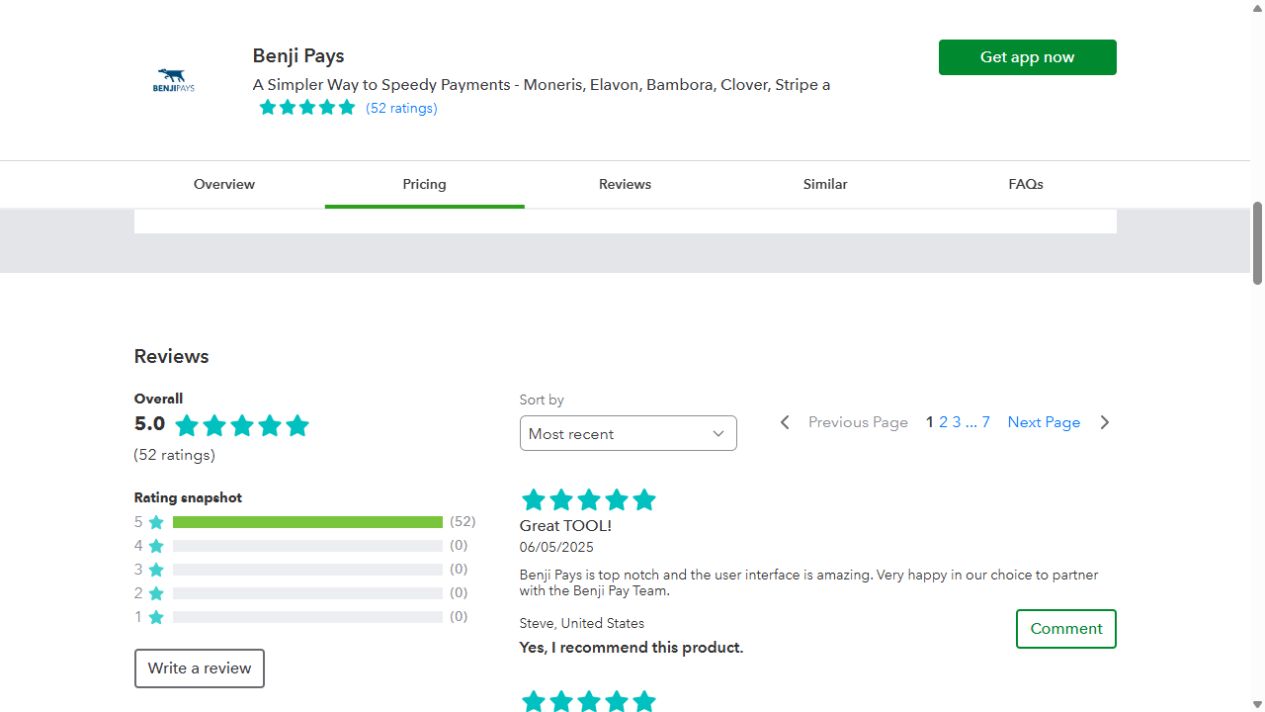
G2 and QuickBooks comparisons each use the same platform. Review counts and reviewer groups differ; these are customer ratings, not a controlled product test or platform endorsement. Capterra and Xero are additional platform-specific snapshots. Scores and counts can change. All rating sources and dates
01 · Review
Bring your PSA, accounting system, processor statement and current subscription terms. We’ll confirm the Benji Pays configuration that fits.
02 · Verify
Check saved-method transfer feasibility with the processors involved. Confirm customer authorizations, timing and any transfer costs.
03 · Validate
Walk through invoice delivery, a payment, a failed-payment retry, a refund and settlement reconciliation. Confirm each step in your accounting system.
Our onboarding team can help you plan the switch. Transfer availability and any outstanding contract costs depend on your existing agreements; review them before setting a cutover date.
Switching can reduce both your software bill and recurring payment fees. Benji Payments has no additional gateway, monthly account or PCI fees, and Benji Pays does not take a percentage of your revenue for its platform. In this page’s example, Benji Pays Advanced costs $219 USD per month with annual billing versus $500 under ConnectBooster’s documented legacy 0.5% example: $281 USD less per month in software fees at $100,000 collected and 100 approved transactions. That comparison excludes processing charges. Bring your current bill and our team can confirm your potential total saving, including processing rates, transaction counts and any remaining commitments.
Yes. Benji Pays combines automated collections, a customer payment portal and accounting synchronization with MSP workflows for HaloPSA, ConnectWise PSA and Autotask. You also get integrations built by our own engineers, in-house support and platform pricing that does not take a percentage of your revenue. Choose Benji Payments for integrated processing without additional gateway, monthly account or PCI fees.
Yes, if your existing processor and gateway are supported. Benji Pays gives you the choice to keep a compatible merchant account or use Benji Payments for integrated processing and settlement reconciliation. With Benji Payments, there are no additional gateway, monthly account or PCI fees. Our team can confirm compatibility and help you choose the setup that works best for your business; existing third-party providers retain their own fees and terms.
Benji Pays Advanced includes PSA integrations and 100 approved transactions per month for $219 USD per month billed annually, or $259 USD month-to-month. Additional approved transactions are $0.80 USD each. Your platform charge follows your plan and transaction count, so collecting larger invoices does not increase it when the transaction count stays the same. Standard starts at $139 USD per month billed annually; Business Central is available on Elite. Payment processing is priced separately.
No. Benji Pays places no dollar-volume cap on any plan, and its platform fee does not take a percentage of the amount you collect. That means larger invoice values do not increase your platform charge when your plan and approved transaction count stay the same. Each plan includes a transaction allowance, with additional approved transactions charged at the published rate.
Benji Pays does not charge a percentage of payment volume for its platform. By comparison, ConnectBooster’s documented legacy example charges 0.5% with a monthly floor: $100,000 collected produces a $500 software fee. Benji Pays Advanced is $219 USD per month billed annually with 100 approved transactions included. That is $281 USD less in monthly software fees in the page’s stated example, before processing costs. ConnectBooster’s actual rate, floor, cap and pricing model depend on the agreement.
Benji Pays supports optional card surcharging with native pass-through, so the surcharge does not need to become a separate invoice line item. ConnectBooster also documents surcharging through EPX and XplorPay. Benji Pays’ advantage is the way surcharging fits into its payment and accounting workflow; availability depends on your processor and region.
Benji Pays lets you process refunds inside the platform and synchronize the accounting update automatically. Your team can complete the payment and bookkeeping workflow together. ConnectBooster’s documented BNG workflow requires a refund in the gateway followed by a manual QuickBooks payment-receipt update; other processor integrations may differ.
Yes. We’ve successfully helped many MSPs migrate their saved payment methods from ConnectBooster to Benji Pays. Our onboarding team will guide you through the process and confirm the steps for your payment setup, so you can make the move with confidence.
Yes. Our engineers build and maintain Benji Pays’ PSA and accounting integrations, and our own team handles support. You work with the company responsible for the connections your finance workflow depends on. Our open API and MCP access also let you extend Benji Pays with your own tools and approved AI assistants.
No. Benji Payments has no additional monthly account, gateway or PCI fees. That removes recurring fee categories found in ConnectBooster’s documented gateway and processor schedules. You pay the Benji Pays software subscription and applicable transaction processing charges. The fee advantage is specific to Benji Payments; a separate third-party processor has its own terms.
Benji Payments removes additional monthly account and PCI fees from your processing setup. ConnectBooster’s published EPX surcharging schedule lists $17.95 per month in account/PCI fees plus $79.95 annually for reporting. XplorPay’s new-client schedule lists $23.95 per month in account/security fees plus $79.95 annually for reporting. Those charges are in addition to software and transaction fees; the applicable processor schedule determines your actual bill.
Yes. Benji Pays provides an open API and MCP access so your developers can build custom payment and finance workflows, and approved AI assistants can work with Benji Pays tools. That gives you options beyond preset integrations. No general-purpose customer API, MCP server or native AI tools were found in the ConnectBooster documentation reviewed for this comparison; its documented gateway APIs and custom connection commands serve specific integrations.
Benji Pays earned the higher displayed rating on G2: 5.0 out of 5 from 15 reviews (as of Nov 2026), versus ConnectBooster’s 4.3 from 26 reviews when checked October 12, 2026. You can read both sets of customer feedback through the links above. These are dated ratings from different reviewer groups, and scores can change.
No contract is required for Benji Pays Standard, Advanced or Elite: you can stop anytime and choose monthly or annual billing. That lets you choose Benji Pays on its value to your business. ConnectBooster’s terms specify a defined Committed Service Term in the applicable order. Benji Pays Enterprise arrangements are custom and should be reviewed separately.
Benji Payments has no additional gateway fees. ConnectBooster’s published legacy BNG schedule adds $15 per month for the card platform connection and $15 per month for the customer token vault, before usage charges. That is $30 per month for those two gateway line items alone, plus $0.11 per transaction and $0.50 per token change. The schedule is for legacy BNG accounts and some accounts differ; your agreement determines which fees apply.
Benji Pays has the higher displayed score on the US QuickBooks App Store: 5.0 out of 5 from 52 ratings, all five-star, versus ConnectBooster’s 3.8 from 86 ratings. Both were checked October 12, 2026. ConnectBooster also showed 3.8 from 12 reviews on Capterra. The listings above let you read the customer feedback directly; scores and counts can change.
Bring your PSA, ledger and payment setup. Let’s walk through the details.
Benji Pays integrations lists supported processors. ConnectBooster terms, §1(d–e) (opens in a new tab) describes supported payment partners, approval and separate processing fees. Neither list proves compatibility with every merchant account.
Benji Pays pricing publishes plans and billing options. The ConnectBooster legacy guide (opens in a new tab) provides the $199 floor/0.50% example; its payments FAQ (opens in a new tab) describes a $149 base or 0.5%, whichever is greater. At $100,000, either example gives $500. The page illustration compares figures in the same currency, Benji Pays Advanced annual billing, and 100 approved transactions per month. $500 minus $219 USD is $281 USD/month; repeated for 12 months, $3,372 USD. This is a software-fee illustration, not an all-in processing quote. Terms, §2 (opens in a new tab) also describe flat-fee plans.
Benji Pays’ absence of dollar-volume caps was confirmed by the company on October 11, 2026. Its platform pricing follows plan and approved transaction count. ConnectBooster’s legacy guide (opens in a new tab) documents typical floors of $99–$349, rates of 0.40%–0.65% and a standard $1,000 fee cap, subject to the agreement. The illustration uses its 0.50% example, not a universal rate or current new-customer quote.
Benji Pays setup options (opens in a new tab) and payment-link workflows. ConnectBooster: ConnectWise guide (opens in a new tab), Autotask guide (opens in a new tab), BMS guide (opens in a new tab). Named connections do not establish feature parity or universal two-way PSA synchronization. The ConnectBooster list describes verified examples, not every possible connection.
Benji Pays systems and plan availability. ConnectBooster’s getting started guide (opens in a new tab), invoice-image guide (opens in a new tab) and NetSuite page (opens in a new tab) document its named systems. Confirm the currently offered connection, version and implementation with the provider.
Benji Pays features and ConnectBooster product page (opens in a new tab). ConnectBooster AutoPay settings (opens in a new tab) explains term, amount and contract criteria. No measured collection-speed or time-saving advantage is claimed here.
Benji Pays’ native pass-through presentation was confirmed by the company in the October 5 comparison revision. ConnectBooster publishes EPX surcharging (opens in a new tab) and XplorPay surcharging (opens in a new tab) documentation. Availability and terms depend on the selected setup. The previous page’s blanket “No” for ConnectBooster is removed.
Benji Pays’ accounting-sync page documents automatic refund synchronization; fully integrated refunds were also confirmed directly by the company on October 11, 2026. ConnectBooster’s refund guide (opens in a new tab) instructs a BNG gateway refund and manual QuickBooks receipt update. It says other integrations may differ. The workflow comparison is scoped to that documented setup.
Benji Payments accounting guide (opens in a new tab) and reconciliation overview. ConnectBooster advertises payment reconciliation (opens in a new tab); its deposit-matching guide (opens in a new tab) gives a QuickBooks/XplorPay example with manual matching. Invoice-payment posting and full settlement reconciliation are distinct tasks.
All Benji Pays support being in-house was confirmed by the company on October 11, 2026. Published service levels vary by plan. ConnectBooster’s product page (opens in a new tab) describes U.S.-based support and onboarding. No response-time comparison is asserted.
Benji Pays’ integration ownership was confirmed by the company in the prior comparison revisions. Setup guides (opens in a new tab) and API and MCP documentation (opens in a new tab) provide implementation detail. ConnectBooster’s custom integration guide (opens in a new tab) documents custom integration options. No outsourcing claim is made about ConnectBooster. See the developer-access comparison for public API, MCP and AI-tool availability.
Benji Pays pricing states no contracts and you can stop anytime; this comparison covers Standard, Advanced and Elite. The page separately lists a custom Enterprise contract. Benji Pays’ no-contract positioning was also confirmed by the company October 12, 2026. ConnectBooster terms, §1(a) (opens in a new tab) establishes a defined Committed Service Term in the order. Its QuickBooks listing also advertises month-to-month pricing; do not infer a universal multi-year commitment. The applicable order governs. Terms, §1(f) (opens in a new tab) explains transfer limitations.
Benji Payments’ absence of additional monthly account or PCI fees was confirmed directly by the company on October 11, 2026. ConnectBooster’s terms, §1(d–e) (opens in a new tab) requires a supported third-party processor and separate processing agreement. EPX surcharging pricing (opens in a new tab) lists $7.95/month PCI Plus, $10/month account on file and $79.95/year reporting. XplorPay new-client pricing (opens in a new tab) lists $18.95/month Data Guardian, $5/month account on file and $79.95/year reporting. These examples do not establish fees for every processor or account. Legacy BNG pricing (opens in a new tab) also lists gateway/vault and processor-dependent ACH connection fees; do not add those to a quote without confirming applicability.
Checked October 12, 2026, with the Benji Pays G2 count updated to 15 reviews as of Nov 2026. On G2: Benji Pays (opens in a new tab) 5.0/5 from 15 reviews; ConnectBooster (opens in a new tab) 4.3/5 from 26 reviews. On the US QuickBooks App Store: Benji Pays (opens in a new tab) 5.0/5 from 52 ratings; ConnectBooster (opens in a new tab) 3.8/5 from 86 ratings. The store displays rounded one-decimal scores (ConnectBooster’s header accessibility value is 3.848). ConnectBooster on Capterra (opens in a new tab) displays 3.8/5 from 12 reviews. Benji Pays’ Xero App Store (opens in a new tab) snapshot remains 5.0/5 from 8 reviews, captured October 11. G2 and QuickBooks compare the products on the same platform; reviewer populations and sample sizes still differ. No Benji Pays Capterra score or ConnectBooster Xero score is asserted. Screenshots reused from the FlexPoint comparison are dated October 11; the new ConnectBooster QuickBooks capture is dated October 12. Ratings are customer feedback, not endorsements.
Benji Pays developer documentation (opens in a new tab) describes API authentication and access; MCP access is retained from the company-confirmed prior comparison. No general-purpose customer developer API, MCP server or native AI tools were found in the reviewed ConnectBooster product page (opens in a new tab) and support documentation as of October 11, 2026. Its custom integration guide (opens in a new tab), Dynamics GP connector guide (opens in a new tab) and Quoter gateway guide (opens in a new tab) describe specific integrations and APIs. Those connections do not establish a public API for building against the ConnectBooster platform. This is a statement about documented public availability, not a claim that ConnectBooster uses no APIs internally.
Legacy BNG gateway pricing (opens in a new tab) lists $15/month plus $0.11/transaction for the card platform connection, and $15/month plus $0.50/token change for the customer vault. Together those two monthly line items total $30; this is not an all-in processing price. Level 3 is a separate $10/month plus $0.10/transaction line item. The schedule is explicitly for legacy accounts and says some accounts differ. Do not add BNG fees to EPX or XplorPay examples without establishing that they apply. Benji Payments’ confirmed $0 monthly account/PCI fees do not establish zero charges for every third-party gateway.
FAQs revised October 19, 2026. Benji Payments’ absence of additional gateway fees was confirmed directly by the company in this revision, in addition to the earlier monthly account/PCI confirmation. The company also confirmed that it has successfully helped many MSPs migrate saved payment methods from ConnectBooster to Benji Pays; the migration answer reflects that experience. Benji Pays pricing confirms no percentage of revenue for the platform, plan prices and the Standard/Advanced/Elite no-contract positioning. ConnectBooster’s legacy volume guide (opens in a new tab), gateway schedule (opens in a new tab), EPX schedule (opens in a new tab), XplorPay schedule (opens in a new tab), refund guide (opens in a new tab) and terms (opens in a new tab) were rechecked October 19. The savings answer explains fee categories and the stated software example; it does not assert measured savings for almost all customers or guarantee a lower total bill. Review snapshots retain their original verification dates.
Updated October 19, 2026.