Connect your accounting system
Connect QuickBooks, Xero or Microsoft Dynamics 365 Business Central.

Less chasing. Payments that post themselves.
Last updated November 26, 2026.
Benji Pays automates accounts receivable (AR) follow-up, payments and posting. Your invoices stay in QuickBooks, Xero or Microsoft Dynamics 365 Business Central.
Connect QuickBooks, Xero or Microsoft Dynamics 365 Business Central.
Invoice Rover sends upcoming and overdue reminders, and customers pay by card or bank payment from a link, the portal or AutoPay.
Each payment is recorded against its invoice in your accounting system.
Invoice Rover and AutoPay
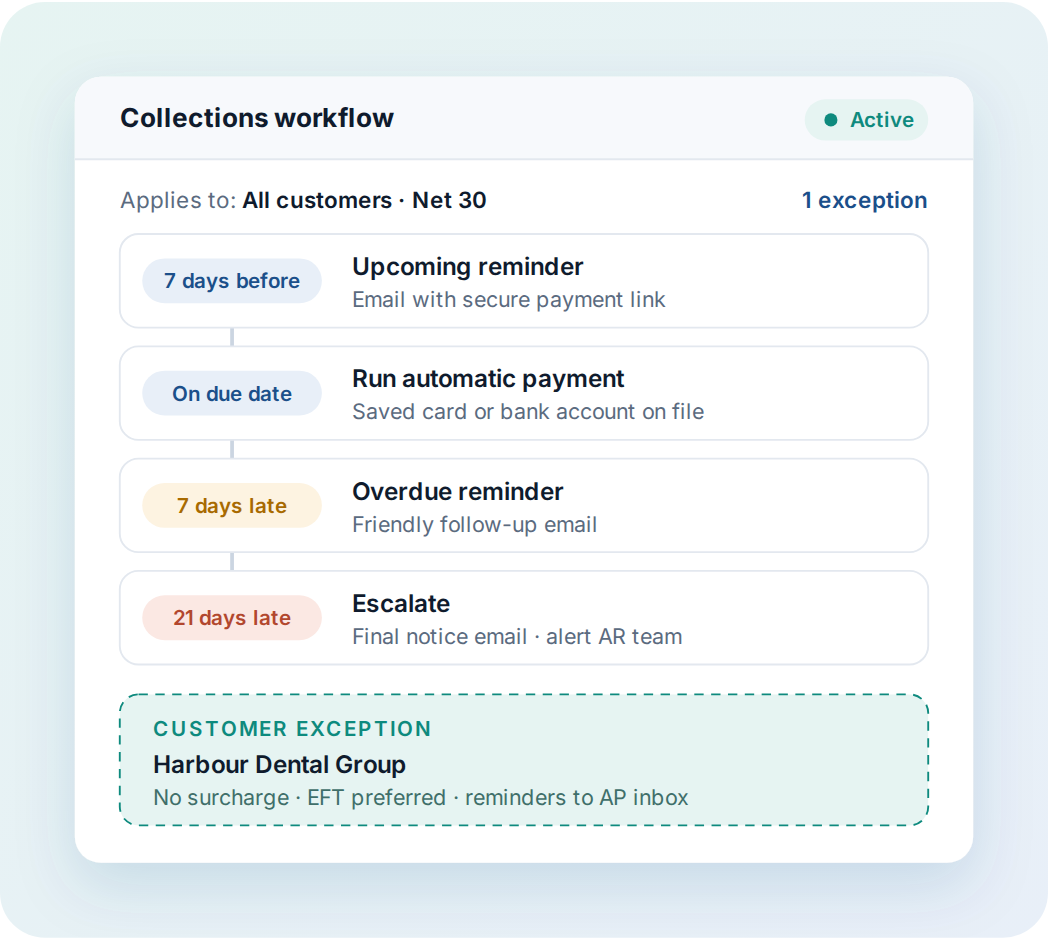
Choose how reminders and payments are handled, broadly or customer by customer. Invoice Rover sends the reminders, and AutoPay charges the saved payment method on the invoice due date.
Customer portal and reconciliation
Customers pay from a payment link or the customer portal. Benji Pays records each payment against its invoice in your accounting system.
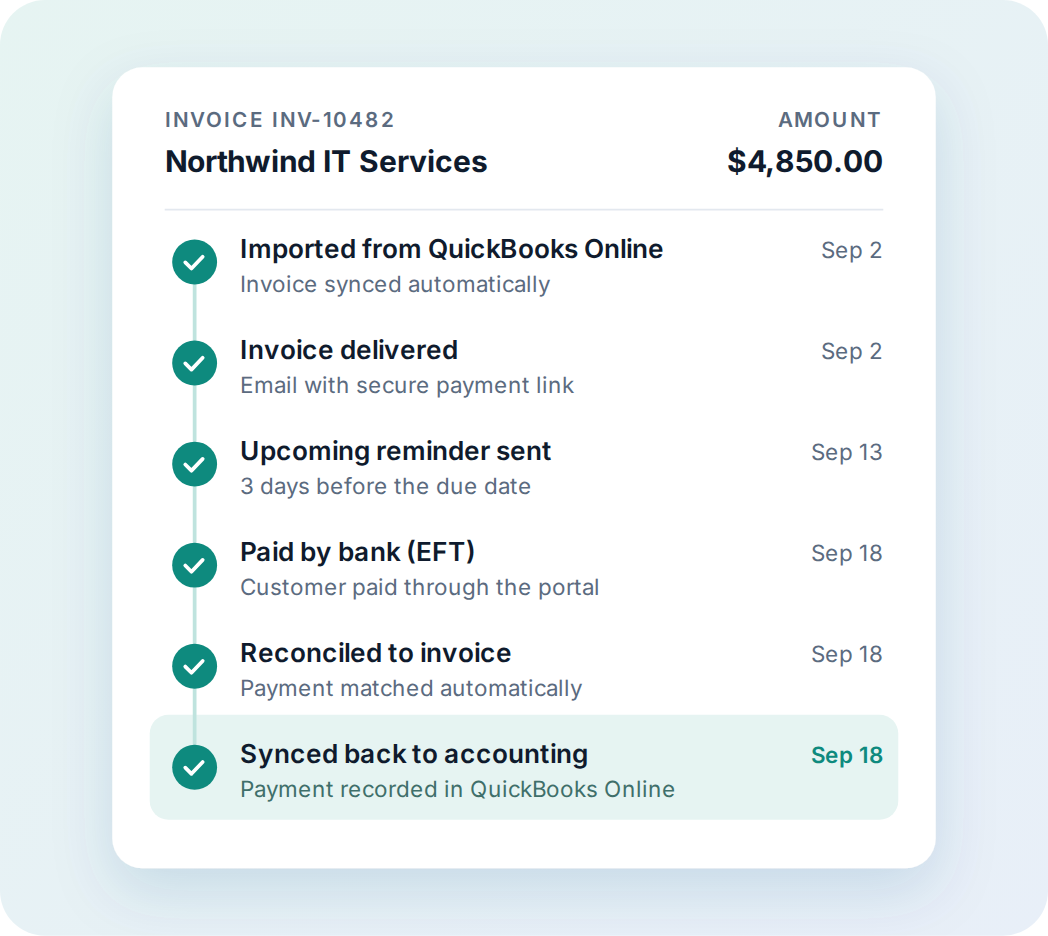
Your customers get clear reminders and an easy way to pay. Your team stops chasing and keying payments by hand.
The same invoice-to-cash steps, done by hand and done with Benji Pays.
| Step | Benji Pays | By hand |
|---|---|---|
| Invoice follow-up Reminders before and after the due date | Invoice Rover sends them Upcoming and overdue reminders go out on their own. Rule-based reminders decide who gets a nudge, with customer-specific exceptions. 1 | Someone writes each one Your team checks what is due, drafts the email, and remembers to follow up again. 1 |
| Recurring payments Customers who pay every invoice the same way | AutoPay Customers enroll in automatic payments. AutoPay charges the saved payment method on the invoice due date (the Auto Processing setting). 2 | Collected one at a time Each payment waits for the customer to send it, or for your team to run it. 2 |
| Paying an invoice How a customer pays | Payment link or customer portal Customers view open invoices, pay by card or bank payment, pay more than one invoice at once, and store payment methods. 3 | Checks, transfers and phone calls Customers mail a check, send a bank transfer, or call your office to pay by card. 3 |
| Recording the payment Getting the payment into the books | Posted automatically The invoice is marked paid and the payment is applied to the right account in your accounting system. 4 | Keyed in by hand Someone enters each payment in the accounting system and applies it to the invoice. 4 |
| Matching deposits Deposits, fees and refunds | Matched automatically The deposit is matched, and processing fees, surcharges, refunds and voids are recorded the same way every time. 4 | Matched line by line Someone compares gateway reports and bank deposits with accounting entries, and enters fees by hand. 4 |
| Bank payments ACH and EFT | Bank payment from the same link Bank payments cost less than card. Processor fees still apply. 5 | Transfers you track down Your team finds each bank transfer on the statement and matches it to the invoice. 5 |
| Your accounting system Where invoices live | Stays the source of truth Benji Pays is not a general ledger. Invoices stay in your accounting system, and payments post back to it. 6 | Updated by hand after every payment Someone enters each payment and keeps the books current. 6 |
Manual accounts receivable is collecting and recording invoice payments by hand. Your team sends reminders, takes payments by check, bank transfer or phone, keys each payment into the accounting system, and matches it to the bank deposit.
Benji Pays automates invoice follow-up with Invoice Rover, online payments through payment links and the customer portal, AutoPay, and posting each payment back to your accounting system.
No. Benji Pays is not a general ledger. Your invoices stay in your accounting system, such as QuickBooks, Xero or Microsoft Dynamics 365 Business Central, and Benji Pays posts payments back to it.
No. You keep creating invoices the way you already do. Benji Pays follows them up, collects the payment, and records it against the invoice.
Customers pay by card or bank payment from a payment link or the customer portal. In the portal they view open invoices, pay more than one invoice at once, store payment methods, and enroll in automatic payments.
Yes. Bank payments cost less than card. Customers pay by ACH or EFT bank payment from the same payment link or portal. Benji Pays does not take a percentage of your revenue for its platform. Processor fees still apply.
Plans and included transactions are listed on the Benji Pays pricing page. Benji Pays does not take a percentage of your revenue for its platform. Processor fees still apply.
Benji Pays is accounts receivable (AR) automation software for managed service providers (MSPs) and invoice-based businesses.
Bring your invoices, your accounting system and your questions.
Invoice Rover sends reminders for upcoming and overdue invoices, with rule-based reminders and customer-specific exceptions. The By hand column describes the same step done by a person.
Customers enroll in automatic payments, and AutoPay charges the saved payment method on the invoice due date by default (the Auto Processing setting). The Delay Days setting moves it a number of days before or after the due date.
Customers view open invoices, pay by card or bank payment, pay more than one invoice, and store payment methods.
The invoice is marked paid, the payment is applied to the right account, and the deposit is matched. Processing fees, surcharges, refunds and voids are included.
Bank payments cost less than card. Benji Pays does not take a percentage of your revenue for its platform. Processor fees still apply.
Benji Pays is not a general ledger. Invoices stay in your accounting system.
The By hand column describes the steps of doing accounts receivable by hand. It cites no surveys and contains no figures. The Benji Pays column restates features published on benjipays.com, checked November 26, 2026.
Benji Pays features checked November 26, 2026 on benjipays.com.